
WhatsApp Proxy Settings for Multiple Accounts in WASender
This guide explains the account-level network and browser settings available in WhatsApp bulk sender software.
WASender can store a proxy, region, language, and browser fingerprint configuration for each WhatsApp account workspace. These controls help a team keep account environments documented and separate instead of relying on one shared system configuration.
A proxy or VPN only changes how network traffic is routed. It does not grant permission to contact people, change WhatsApp rules, or guarantee delivery, reading, or account outcomes.
What WASender can configure
For each account environment, WASender supports:
- An HTTP or SOCKS5 proxy address and credentials.
- A region and language associated with the workspace.
- A browser fingerprint configuration for that account.
- Connection testing before an account is used for a sending task.
- A clear association between an account, its environment, and its tasks.
These settings are useful when a team manages accounts that require separate network routes or operating contexts. They are environment-management controls, not a substitute for recipient permission and responsible messaging.
System VPN or account-level proxy?
| Option | Scope | Useful when | Limitation |
|---|---|---|---|
| System VPN | Usually affects the computer or selected applications | One operator needs a shared route for general connectivity | Does not provide a different route for every WASender account |
| Account-level HTTP/SOCKS5 proxy | Assigned to a specific WASender account | Multiple workspaces require separate, documented proxy settings | Requires a compatible and reliable proxy service |
Choose the setup that matches your network requirements. WASender does not require a particular proxy provider and does not certify third-party network services.
How to configure an account proxy in WASender
1. Collect the connection details
Prepare the host, port, protocol, and any username or password supplied by your proxy provider. Confirm which region the endpoint represents and whether the address is intended to stay stable.
2. Open Environment Configuration
In WASender, open Environment Configuration and select the WhatsApp account workspace you want to configure. This keeps the settings attached to the intended account rather than applying them to every account.
3. Enter and test the proxy
Add the HTTP or SOCKS5 connection details, then use the connection test before saving. A successful test confirms that the endpoint is reachable at that moment; it is not a guarantee of future service quality.
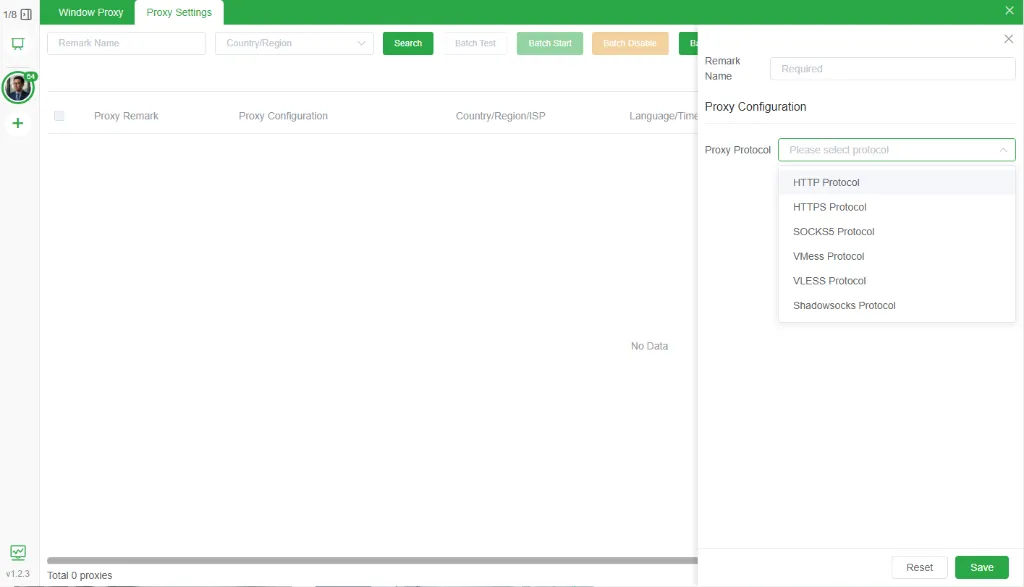 Assign and test a proxy in the account-level environment configuration.
4. Review region, language, and fingerprint settings
Set the region and language required by your operating workflow. Review the fingerprint configuration for the account and keep a record of which environment belongs to which workspace.
5. Verify the account before starting a task
Confirm the account is connected, the selected proxy still responds, and the correct account is attached to the task. Then review the contact source, message content, and sending schedule.
Environment checklist
- The proxy endpoint is reachable and its credentials are current.
- The proxy is assigned to the intended account workspace.
- Region, language, and fingerprint settings are documented.
- The operator can identify which account owns each sending task.
- Contacts have a valid reason to receive the message.
- Message timing, pause controls, and opt-out handling have been reviewed.
How environment settings fit the bulk messaging workflow
Environment configuration is one part of a wider process. A practical workflow is to verify and deduplicate contacts, prepare personalized contact or group messages, select the correct account, review its environment, and then monitor the sending task in the dashboard.
Task feedback such as sent, read, interested, rejected, and failed should be reviewed in context. Interested and rejected classifications benefit from human review before the next follow-up action.
Frequently asked questions
Does WASender include a proxy service?
WASender provides fields for configuring and testing supported proxy connections. The proxy service itself comes from the provider selected by the user.
How many accounts can share one proxy?
There is no universal number that suits every network or account setup. Document the intended environment for each account and follow the requirements of the proxy provider and the applicable platform policies.
Does a proxy guarantee message delivery or account availability?
No. A proxy changes network routing. Results also depend on account condition, recipient permission, contact quality, message relevance, recipient behavior, connectivity, and applicable policies.
Should a proxy endpoint change during an active task?
Avoid changing an account's environment without an operational reason. If a connection must be changed, pause the task, update and test the configuration, and verify the correct account before continuing.
Organize multiple WhatsApp account environments
WASender brings account settings, bulk sending tasks, group sending, number verification, scheduled Status, and task feedback into one workspace. Download WASender to review the environment configuration available for each account.
Free WhatsApp Number Checker – Verify Active Numbers
Master the WhatsApp Number Check method to instantly verify active numbers. This guide shows you 3 efficient ways to filter valid contacts and boost your marketing workflow.
WhatsApp Recruitment Guide: Candidate Outreach with WASender
Learn how recruiting teams can prepare candidate lists, send personalized WhatsApp messages, manage replies, and track follow-up tasks with WASender.