
WhatsApp Recruitment Guide: Candidate Outreach with WASender
This playbook shows how recruiters can use a bulk WhatsApp sender to prepare candidate lists and organize outreach tasks.
Recruiters often use email, professional networks, and messaging together because candidates respond differently across channels. WhatsApp can add a direct, conversational option when the candidate has provided a number and there is a legitimate reason to contact them.
This guide shows how to prepare a candidate list, verify which numbers are registered, personalize an invitation, control a bulk sending task, and review replies. It does not assume that every candidate will open or answer a message.
Quick Summary: The WhatsApp Recruitment Strategy
Here is a five-step WASender workflow for a permission-aware recruiting list:
- Export Candidate Data: Compile your sourcing lists (from LinkedIn, portfolio sites, or internal ATS) into a CSV file with names and phone numbers.
- Filter Inactive Numbers: Use WASender's built-in Number Filter to identify active WhatsApp accounts instantly and avoid wasting resources on dead numbers.
- Personalize Sourcing Messages: Write short, tailored templates utilizing dynamic variables like
{name}and{job_title}. - Control the sending task: Choose the appropriate account, review the interval and pause settings, and monitor progress.
- Organize pre-screening: Share a booking link with candidates who express interest, then confirm the conversation before scheduling.
WhatsApp vs. Traditional Recruitment Channels
The source team recorded the figures below in its recruiting workflow. The original notes did not include a sample size or measurement window, so treat them as case-specific observations rather than general benchmarks or promised results:
| Metric / Channel | Traditional Email | LinkedIn InMail | WhatsApp Outreach (WASender) |
|---|---|---|---|
| Average Open Rate | 15% - 25% | 20% - 30% | 95% - 98% |
| Response Rates | 2% - 5% | 10% - 15% | 35% - 50% |
| Average Response Time | 24 - 48 Hours | 12 - 24 Hours | Under 90 Minutes |
| Cost Per Contact | Low | High (InMail credits) | Extremely Low |
| Sourcing Speed | Slow | Moderate | Ultra-Fast |
The Step-by-Step WhatsApp Sourcing Playbook
Here is the step-by-step implementation guide for organizing recruitment outreach with WASender:
Step 1: Export Candidate Datasets
Start by gathering candidate contacts. You can source candidate names, current roles, and phone numbers from LinkedIn, GitHub, Behance, or your ATS database. Export this data into a standard CSV file. Ensure all phone numbers include their respective international country codes (e.g., +1 for the US, +44 for the UK).
Step 2: Purge Inactive Numbers Using WASender Number Filter
Sending to numbers that are not registered on WhatsApp wastes time and makes task results harder to analyze.
- Open WASender and open the Number Filter tool.
- Import your CSV candidate list.
- Run the verification scan. WASender will check thousands of numbers in minutes, filtering out invalid or non-WhatsApp lines.
- Export the list of active WhatsApp numbers for your outreach.
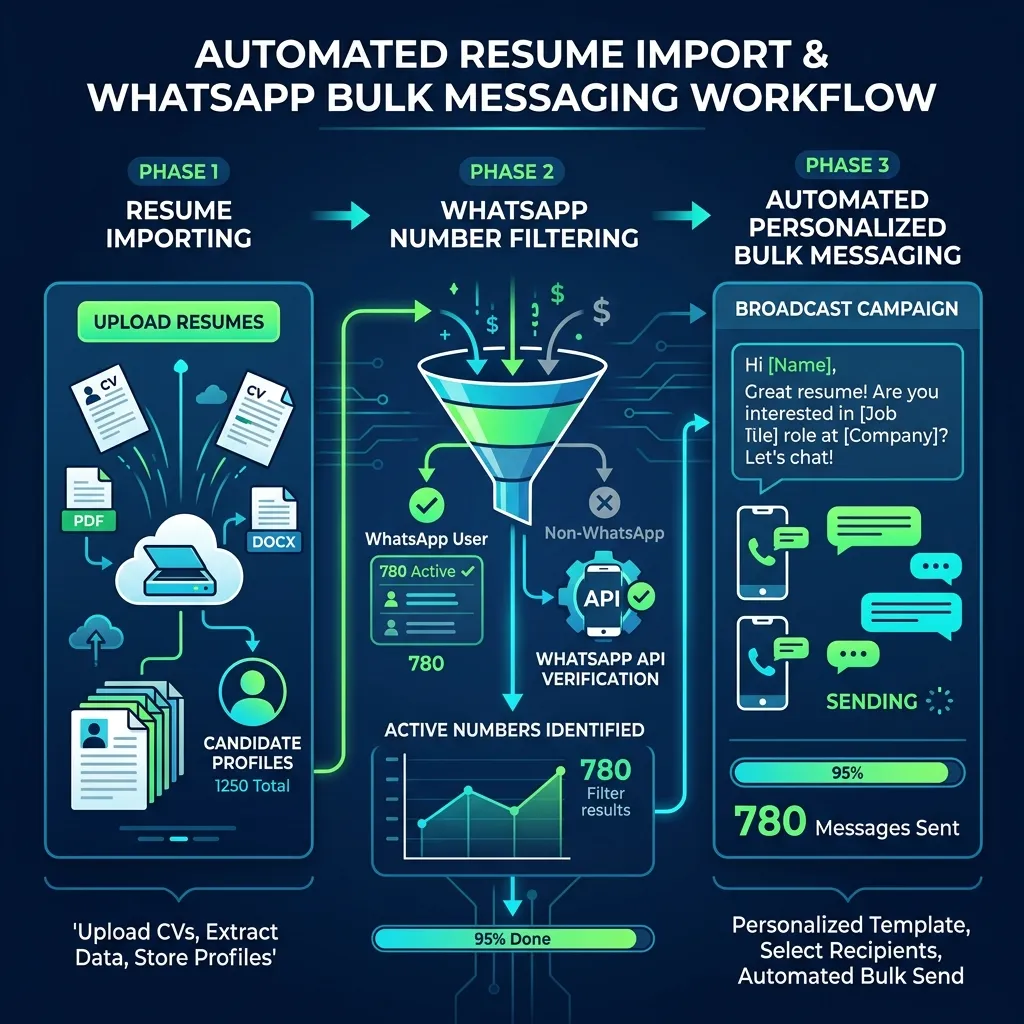 Use WASender's workflow to clean candidate lists, target active WhatsApp numbers, and automate outreach.
Step 3: Craft Relevant, Personalized Invites
Avoid generic unsolicited messages. Explain why you are contacting the candidate and use WASender variables only to make a legitimate invitation clearer:
"Hi , I came across your impressive work in on LinkedIn. We are currently scaling our engineering team at Company and have a remote role that matches your background. Are you open to a quick 5-minute chat? Let me know!"
Keep the message short, friendly, and focus on a clear, low-friction Call to Action (CTA).
Step 4: Configure Sending Controls
Review the sending interval, start time, and pause controls before launch. If several recruiters use different accounts, assign each task to the correct account and keep the work separated in the multi-account workspace. No interval or account count guarantees delivery or account results.
Step 5: Organize Interview Scheduling
Once a candidate expresses interest, review the reply and send an appropriate follow-up containing your calendar link:
"Awesome, ! Here is my calendar link: calendly.com/your-profile. Please pick a time that works best for you and we will speak soon!"
This reduces scheduling back-and-forth while keeping the recruiter responsible for reviewing replies and confirming the next step.
Actionable Checklist for WhatsApp Recruiters
Ensure your bulk sending tasks are optimized and compliant by checking off these items before sending:
- Format all candidate phone numbers with correct international country codes.
- Run the candidate list through the WASender Number Filter to remove inactive profiles.
- Personalize each message using variables like
{candidate_name}and{job_title}. - Review the interval, start time, and pause controls for the task.
- Prepare standard follow-up reply templates with scheduling links.
- Record consent, honor opt-out requests, and review the result before follow-up.
To try this workflow, download WASender, import a permitted candidate list, and start with a small task you can review.
WhatsApp Proxy Settings for Multiple Accounts in WASender
Learn how WASender uses account-level proxy settings, regions, languages, and browser fingerprints to organize separate environments for multiple WhatsApp accounts.
WhatsApp Bulk Messaging for E-commerce & Real Estate
Build bulk WhatsApp messaging workflows for e-commerce and real estate with contact filtering, personalized messages, multiple accounts, and task tracking.