
WhatsApp Status Scheduler Guide for Real Estate Teams
This real-estate guide shows how WhatsApp bulk messaging software can organize scheduled Status content alongside outreach work.
In real estate sales and property rentals, client decision-making cycles are naturally long. High-value property buyers and renters rarely convert on the first interaction. However, constantly sending aggressive direct messages (DMs) with property listings often backfires—annoying prospects, driving up block rates, and triggering WhatsApp anti-spam filters.
WhatsApp Status (Stories) gives real estate teams another way to publish short walkthroughs, room tours, and listing highlights. Contacts can view the content on their own terms and reply when they want more information.
With WASender, real estate teams can prepare and schedule WhatsApp Status images or videos for selected accounts, then review the publishing queue and task result.
In this guide, we explore a real-world case study of a premier real estate firm that transformed its client acquisition using WASender's WhatsApp Status short video automation.
!NOTE
🚀 Executive Summary & Core Strategy
- Non-Intrusive Lead Nurturing: WhatsApp Status short videos showcase luxury walkthroughs without cluttering client chat boxes or causing blocks.
- Consistent Status Publishing: Prepare a weekly content queue and publish each item at the time selected by the team.
- Scheduled publishing: Prepare a week of property videos and select the account and publishing time for each item.
- +300% Inbound Inquiries: High-intent buyers voluntarily swipe up on status videos to book private viewings, resulting in higher conversion rates.
 Figure 1: Automating WhatsApp Status short video drops allows real estate teams to nurture prospects organically without intrusive cold messages.
1. The Challenge: Long Sales Cycles & High DM Block Rates in Real Estate
Apex Realty Group, a premier agency managing over 300 rental properties and luxury residential sales, faced a major marketing challenge:
- Cold DM Fatigue: Agents sent direct WhatsApp messages containing property photos to past leads. However, over 40% of recipients found frequent DMs intrusive and either ignored the message or blocked the agent.
- Inconsistent Manual Status Posting: Agents were advised to post property walkthrough videos to their WhatsApp Status daily. However, manual posting was erratic—agents forgot during busy open-house days or posted at suboptimal hours when clients were not active.
- Wasted Video Assets: High-quality 15-second virtual tour videos created by their media team sat unused in drive folders instead of reaching active buyers.
Apex Realty needed a scheduled channel for presenting listings without repeatedly sending the same direct message to contacts.
2. The Solution: WASender Automated WhatsApp Status Video Scheduler
Apex Realty implemented WASender to automate their WhatsApp Status video publishing workflow. Rather than manually uploading clips every day, agents used WASender's Status Scheduler to queue up HD video tours for the entire week.
Key Advantages of WhatsApp Status Short Video Automation:
- Passive Lead Nurturing: Buyers view property videos voluntarily when checking their WhatsApp Stories feed, eliminating sales pressure.
- Peak Hour Timing: WASender automatically posts videos during optimal viewing windows (e.g., 8:30 AM, 12:30 PM, and 7:30 PM).
- Consistent Content Visibility: Scheduled Status tasks keep listing videos visible without requiring agents to publish each item manually.
- Direct Swipe-Up Conversions: Intrigued buyers swipe up directly on the status video to ask for price details or schedule an in-person viewing.
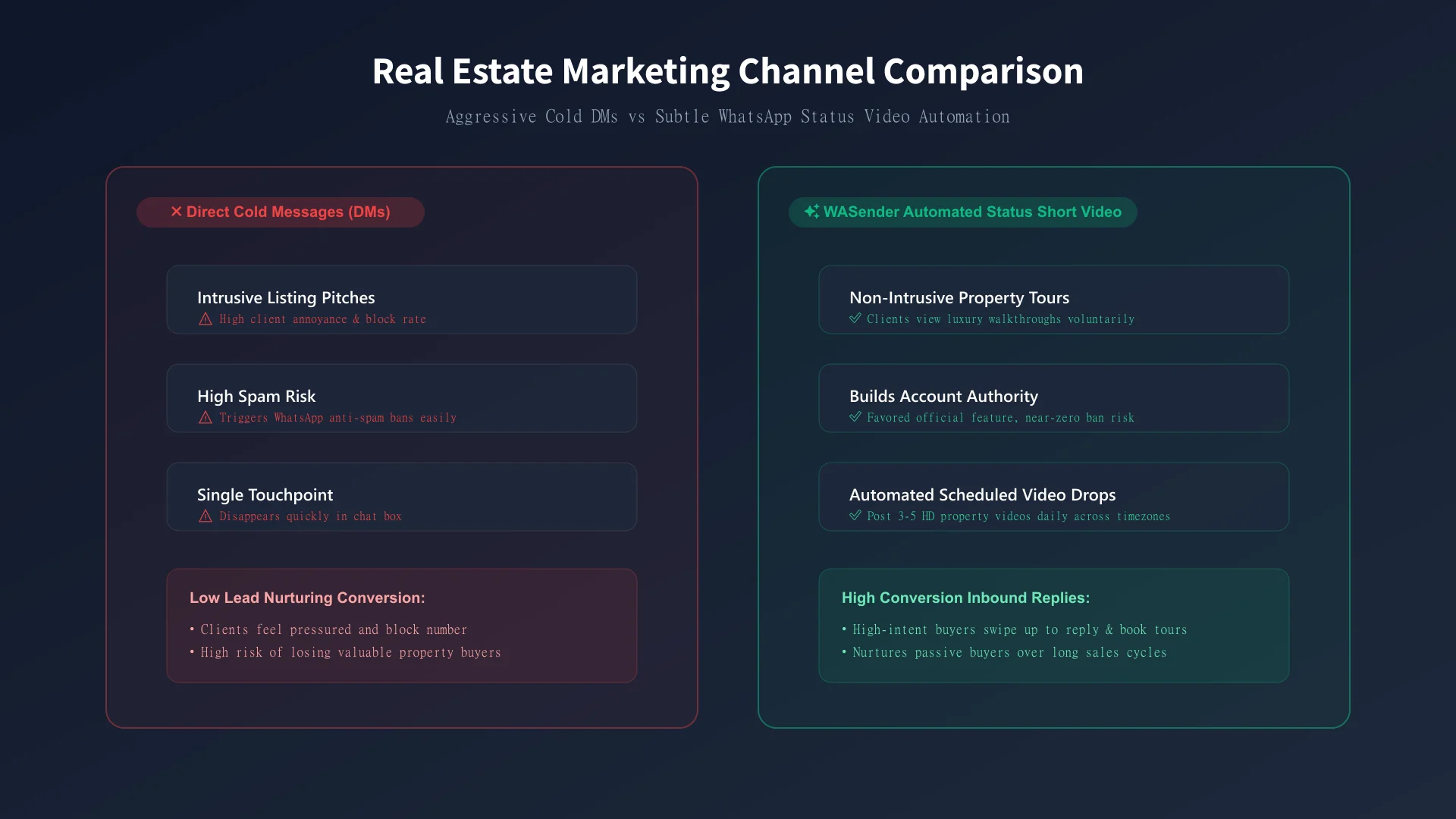 Figure 2: Aggressive DMs cause high block rates, whereas WASender Automated Status videos drive voluntary inbound replies.
3. Comparison: Manual Status Posting vs WASender Automated Status Scheduler
| Feature / Criteria | Manual WhatsApp Status Posting | WASender Automated Status Scheduler |
|---|---|---|
| Posting Consistency | Irregular (Forgotten during busy workdays) | 100% of the planned weekly schedule completed in this case |
| Publishing Hours | Random times when agent is free | Targeted Peak Hours (8:30 AM, 12:30 PM, 7:30 PM) |
| Multi-Media Support | Manual phone upload of clips one by one | Bulk Video Upload with Pre-set Captions & Links |
| Content Planning | Fragmented manual activity | Central weekly publishing queue |
| Agent Time Wasted | 1.5 – 2 hours per day per agent | Zero Daily Overhead (15 mins weekly setup) |
| Publishing Control | Depends on manual availability | Selected accounts, times, and content remain visible in the task queue |
4. Step-by-Step Execution: How Apex Realty Automated Video Status Publishing
Here is the exact 4-step workflow Apex Realty established with WASender:
Step 1: Curate Short Property Tour Videos (15–30 Seconds)
- Media team records 15–30 second vertical short videos highlighting key property features (e.g., ocean view balcony, modern kitchen, spacious master suite).
- Add concise text overlays showing starting rent/price, bedroom count, and location.
Step 2: Upload Video Library & Craft Captions in WASender
- Open the WASender dashboard and navigate to the Status Scheduler tab.
- Drag and drop short video clips into the media queue.
- Attach clear Call-to-Action (CTA) captions (e.g., "Modern 2-Bedroom Apartment in Downtown! Swipe up to schedule a tour today!").
Step 3: Configure Automated Time Slots & Multi-Account Distribution
- Set the publishing calendar: schedule 3–5 short video posts per day at peak browsing hours.
- Select target agent WhatsApp accounts to publish simultaneously across the team.
Step 4: Capture & Convert High-Intent Inbound Replies
Once WASender automatically publishes the status videos, interested buyers swipe up on the story. The agent receives a direct inbound chat request, immediately closing high-intent leads.
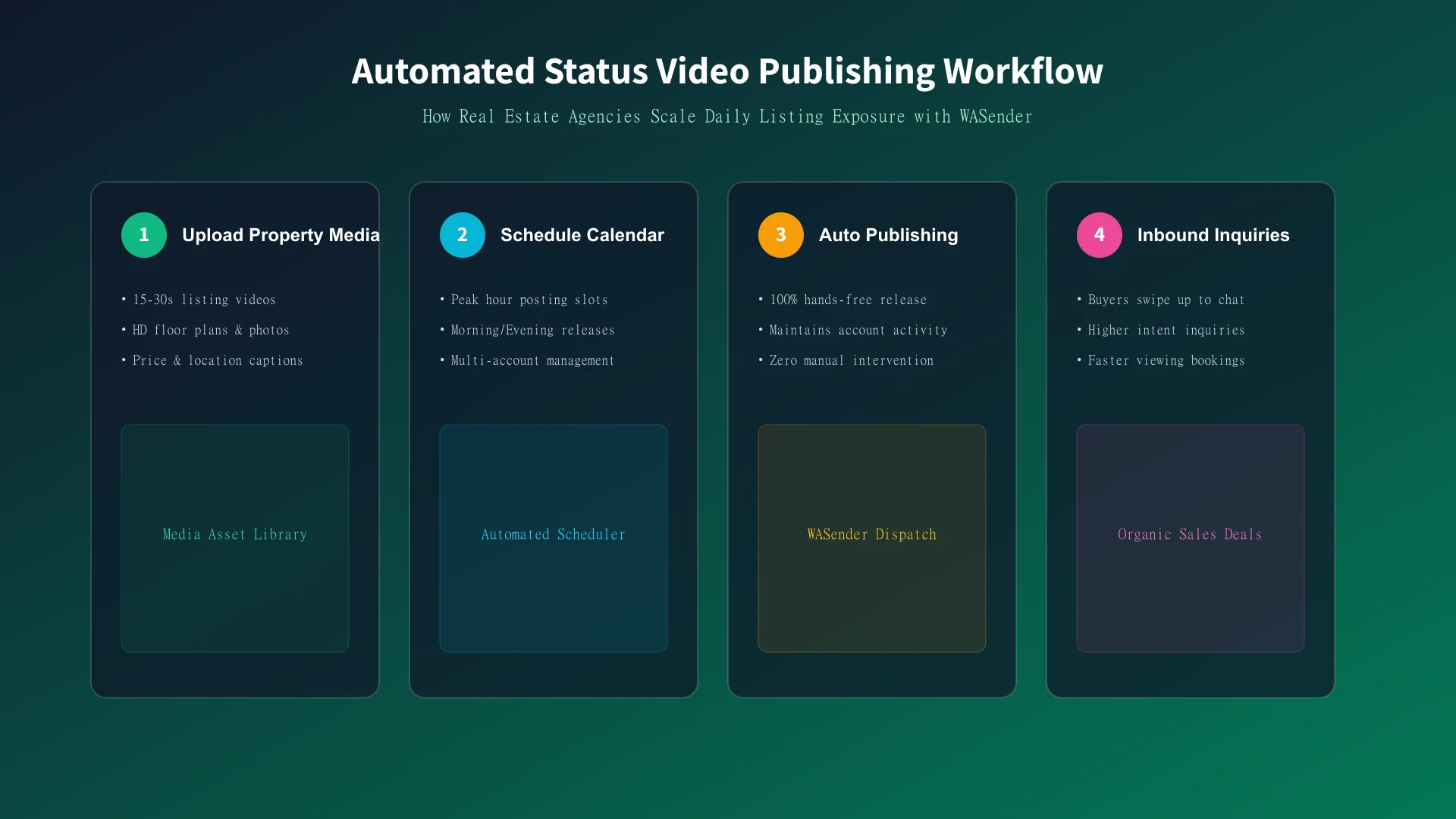 Figure 3: The 4-step automated workflow from short video upload to organic inbound viewing requests.
5. Results & Performance Impact: 300% More Inbound Inquiries
Within 60 days of automating their WhatsApp Status short videos via WASender, Apex Realty achieved outstanding growth:
- +300% Inbound Lead Inquiries: Organic replies from passive buyers looking at status video walkthroughs quadrupled compared to cold DM bulk sending tasks.
- No Suspensions Reported in the Case Window: Apex Realty reported no account suspensions across 15 sales-agent accounts during the measured 60-day period. This is a case result, not a guarantee for other accounts.
- Saving 10+ Hours Per Agent Weekly: Agents saved nearly 2 hours daily previously spent manually posting content, redirecting time toward closing property deals.
- 2.5x Faster Rental Turnaround: Rental units were filled 2.5x faster due to continuous video exposure to active apartment seekers.
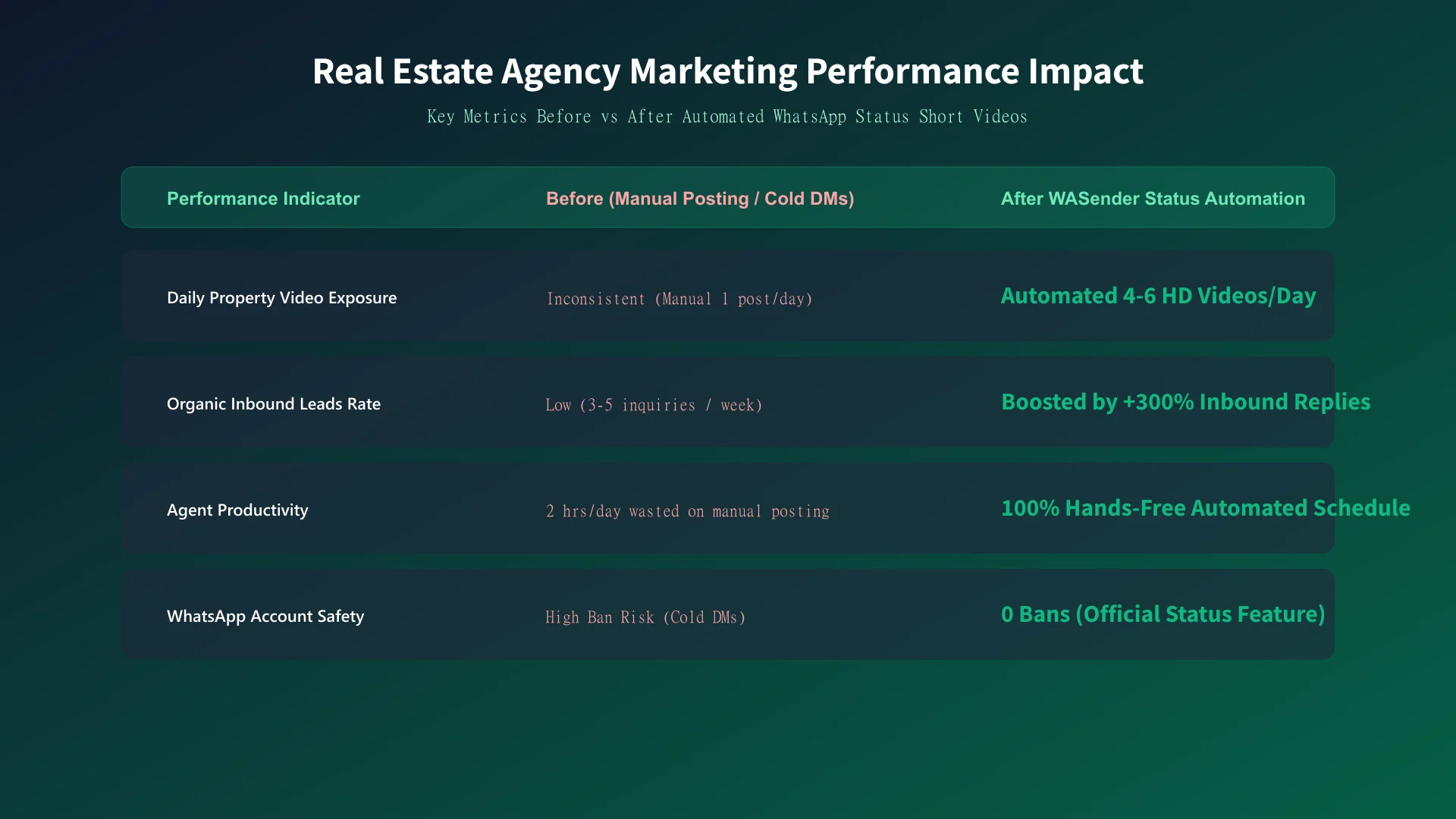 Figure 4: Key Performance Indicators (KPIs) before and after implementing WASender WhatsApp Status Video Automation.
6. Actionable Implementation Checklist for Real Estate Teams
Follow this checklist to optimize your WhatsApp Status video strategy:
- Prepare 15–30 second vertical short videos highlighting top property listings.
- Install and log into WASender to access the Status Scheduler.
- Add engaging captions with clear swipe-up CTAs (e.g., "Swipe up for price & floor plan").
- Schedule 3 to 5 video status updates daily during peak buyer hours.
- Include property location tags and price ranges to qualify leads upfront.
- Monitor inbound status replies in real time and follow up promptly with viewing slots.
❓ Frequently Asked Questions (FAQ)
Q1: What is WhatsApp Status Short Video Automation?
WhatsApp Status Short Video Automation is a feature provided by WASender that allows marketers and real estate agents to schedule and automatically publish short video clips (15–30 seconds) to their WhatsApp Status (Stories) without manual daily uploading.
Q2: Why is WhatsApp Status marketing especially effective for real estate?
Real estate decisions require building long-term trust. Direct messaging can easily feel pushy. WhatsApp Status videos provide a non-intrusive "subtle nurturing" channel where prospects voluntarily watch property tours and swipe up to inquire when they are genuinely interested.
Q3: What does the WhatsApp Status scheduler control?
The scheduler controls the selected content, account, and publishing time. Account outcomes still depend on user behavior, recipient feedback, and applicable WhatsApp policies.
Q4: How do I start automating property video status posts with WASender?
Simply launch WASender, open the Status Scheduler module, upload your short property tour videos, set your desired publishing times, and let WASender handle automated status publishing across your accounts!
WhatsApp SMS Blast: What It Means and When to Use It
Understand WhatsApp bulk messaging versus carrier SMS, choose a workflow for contacts or groups, and prepare relevant messages with clear task feedback.
Why Verify WhatsApp Numbers? The Ultimate Guide to Bulk Checking & Risk Mitigation
Discover why validating WhatsApp numbers before bulk outreach is essential. Learn how WAChecker saves costs, boosts deliverability, avoids account bans, and how the WhatsApp Number Checker extension mitigates verification risks.