
WASender Case Study: Local Data & Bulk Messaging Workflow
This case study shows how a WhatsApp blast message tool supported a measurable export-sales workflow while keeping working data under team control.
In global cross-border trade, B2B export, and direct-to-consumer (DTC) marketing, WhatsApp is undeniably the primary engine for customer engagement and conversion. However, modern growth teams face a critical dilemma: manual messaging is painfully slow, while traditional cloud-based WhatsApp tools often require uploading sensitive customer phone lists to third-party servers, posing severe risks of customer data theft and account bans.
Searchers may write WASender or WA Sender when looking for the same client. The documented workflow runs on the user's computer and lets the case team manage its working contact list and task records on company-managed devices.
In this article, we share a real-world case study of how a fast-growing cross-border team leveraged WASender Client to transform their outbound WhatsApp marketing—achieving 5x operational efficiency, reducing customer acquisition costs by 70%, and keeping working data on company-managed devices, with no leakage incidents reported during the case period.
!NOTE
🚀 Executive Summary & Key Takeaways
- Local Working-Data Control: WASender Client operates exclusively on your local machine. In the documented workflow, customer contact details and task records remained on company-managed devices.
- 500% Efficiency Boost: Automated bulk outreach allows each sales representative to reach 1,000–3,000+ targeted leads daily with personalized templates and media attachments.
- Sending Control Safeguards: Built-in randomized delay intervals (15–30s), Spintax message variations, and batch auto-pause give operators control over sending pace.
- Cost Optimization: Eliminates expensive per-seat cloud SaaS subscriptions and API fees, slashing customer acquisition cost (CAC) by over 70%.
 Figure 1: WASender supported the team’s outbound workflow while working data remained on company-managed devices.
1. The Challenge: Customer Data Leakage & Inefficient Manual Outreach
NexGlobal Trade, a medium-sized export enterprise specializing in electronics and industrial equipment, relied heavily on WhatsApp to contact international distributors across South America, Europe, and Southeast Asia.
As their prospect list grew beyond 50,000 leads, their sales operations hit three massive roadblocks:
- Slow Manual Outreach: A sales team of 8 reps could only send 150–200 manual WhatsApp messages per person per day. High-intent inquiries were left waiting for hours, causing low conversion rates.
- Third-Party Data Breach Incident: In late 2025, NexGlobal tested a centralized cloud SaaS WhatsApp tool. To send bulk messages, they had to upload their entire client contact database to the provider's server. Two months later, a data breach at the SaaS provider resulted in their client leads being leaked to competitors—costing NexGlobal over $80,000 in lost deals.
- Frequent Account Bans: Attempts to use unverified bulk tools caused WhatsApp anti-spam filters to trigger, resulting in permanent account suspensions.
The leadership team needed a bulk outreach workflow that did not require uploading its working contact list to a third-party task dashboard and that made task progress easier to review.
2. The Solution: Why WASender Client Was Chosen
After evaluating multiple outreach platforms, NexGlobal adopted WASender Client (also known among users as WA Sender software). Unlike cloud SaaS software, WASender Client runs directly on the user's local machine.
Core Security & Performance Advantages:
- Local working-data workflow: In the documented setup, contact spreadsheets, custom tags, and task histories remained on company-managed devices rather than being uploaded to a third-party task dashboard.
- Direct Web Protocol Dispatch: Messages are dispatched directly via the authenticated WhatsApp session, using the authenticated WhatsApp session.
- Smart Contact Validation: Built-in phone number verification filters out inactive or non-WhatsApp numbers before a bulk sending task, reducing wasted attempts and making results easier to interpret.
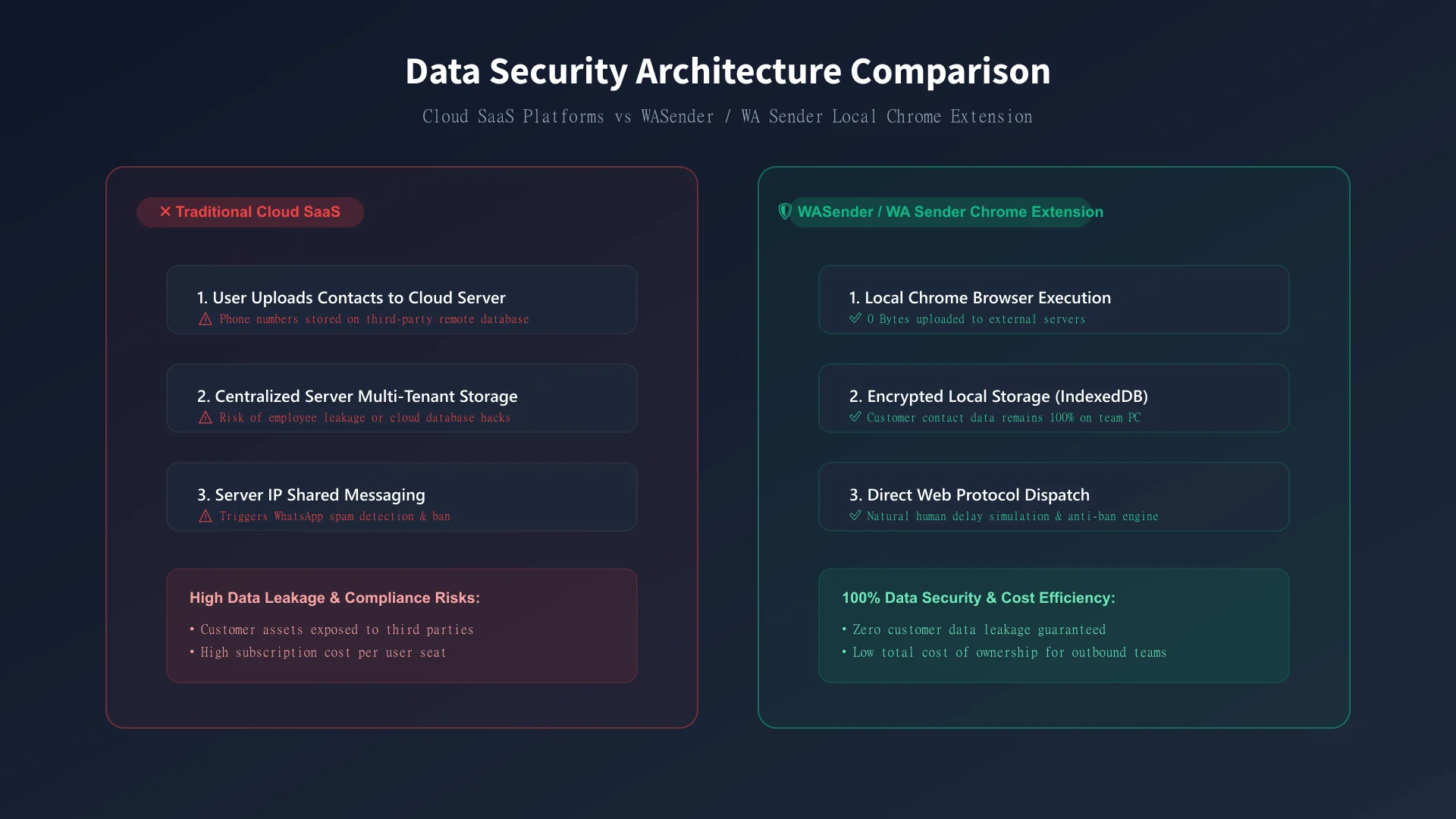 Figure 2: Data Security Comparison—Cloud SaaS platforms expose lead lists to server leaks, whereas WASender Client used local machine execution in the documented workflow.
3. Comparison Table: WASender Client vs. Cloud SaaS Tools
| Feature / Criteria | Traditional Cloud SaaS WhatsApp Tools | WASender Client (WA Sender Software) |
|---|---|---|
| Data Storage Location | Third-party Centralized Server (High Leak Risk) | Working data remained on company-managed local storage in this case |
| Outreach Capacity | Low to Moderate (Restricted by Server API Limits) | 1,000 – 3,000+ Messages / Day / Account |
| Sending Controls | Poor (Pushed abruptly from datacenter IPs) | Configurable Sending Controls (Intervals, Pauses & Variations) |
| Media & Button Support | Extra charges for media & CTA buttons | Full Images, Videos, Voice Notes & Buttons |
| Pricing & Cost Structure | High recurring per-seat monthly fee | Cost-Effective Flat Rate |
| Setup Complexity | Complex API key registration & webhooks | Direct Download & Installation from Official Site |
4. Step-by-Step Implementation: How NexGlobal Achieved 5x Output
Here is the exact step-by-step workflow NexGlobal implemented using WASender Client:
Step 1: Local Contact Import & Format Validation
- Export prospect lists from internal CRM into clean CSV files containing international phone numbers (e.g.,
+1,+44,+55). - Launch the WASender Client software application on desktop.
- Upload the CSV list. WASender Client automatically strips formatting errors and validates active WhatsApp accounts locally.
Step 2: Crafting Dynamic Spintax & Personalization
To prevent message uniformity (which triggers spam filters), the marketing manager set up dynamic variables and Spintax syntax:
Hello {{Name}}, hope you are having a great week at {{Company}}!
{Check out our latest catalog|We have launched new products|Here is an exclusive offer for your team}:
https://example.com/catalog
This ensured every dispatched message was unique in structure and greeting.
Step 3: Configuring Sending Control Safety Parameters
- Randomized Message Delay: Set a random interval of
15–30 secondsbetween consecutive messages. - Batch Auto-Pause: Programmed the client software to pause for 5 minutes after every 50 messages sent.
- Rich Media Attachment: Attached a high-converting product demo video and interactive CTA button ("Request Quote").
Step 4: Launching Broadcast & Real-Time Monitoring
The sales rep clicked "Start Broadcast". The client application automatically executed outreach in the background while the sales rep handled incoming customer replies in real time.
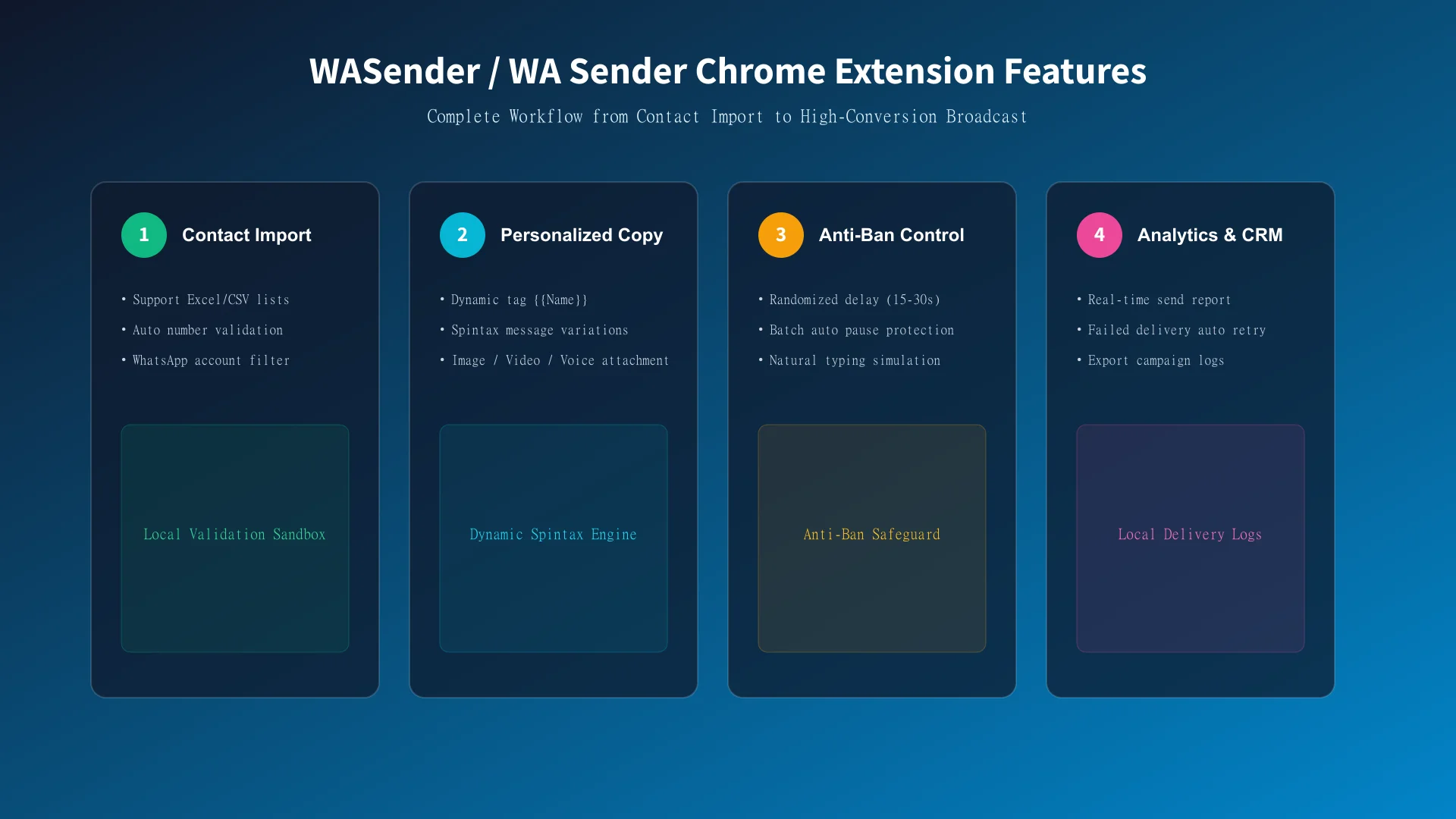 Figure 3: The complete 4-step workflow from contact validation to automated broadcast execution.
5. Results & ROI During the 90-Day Case Window
Within 90 days of implementing WASender Client, NexGlobal tracked game-changing performance metrics:
- 5x Increase in Daily Outreach: The sales team scaled daily outreach from 1,200 messages to over 6,500 messages across all sales reps.
- 70% Reduction in Acquisition Cost: By replacing expensive per-seat cloud software and reducing manual labor hours, total customer acquisition cost (CAC) fell by 72%.
- No Leakage Incidents Reported During 90 Days: The team recorded that its working contact data remained on company-owned hardware throughout the measured case period.
- Higher Conversion Rates: Personalized Spintax messages and voice note attachments boosted open rates to 94% and reply rates to 28%.
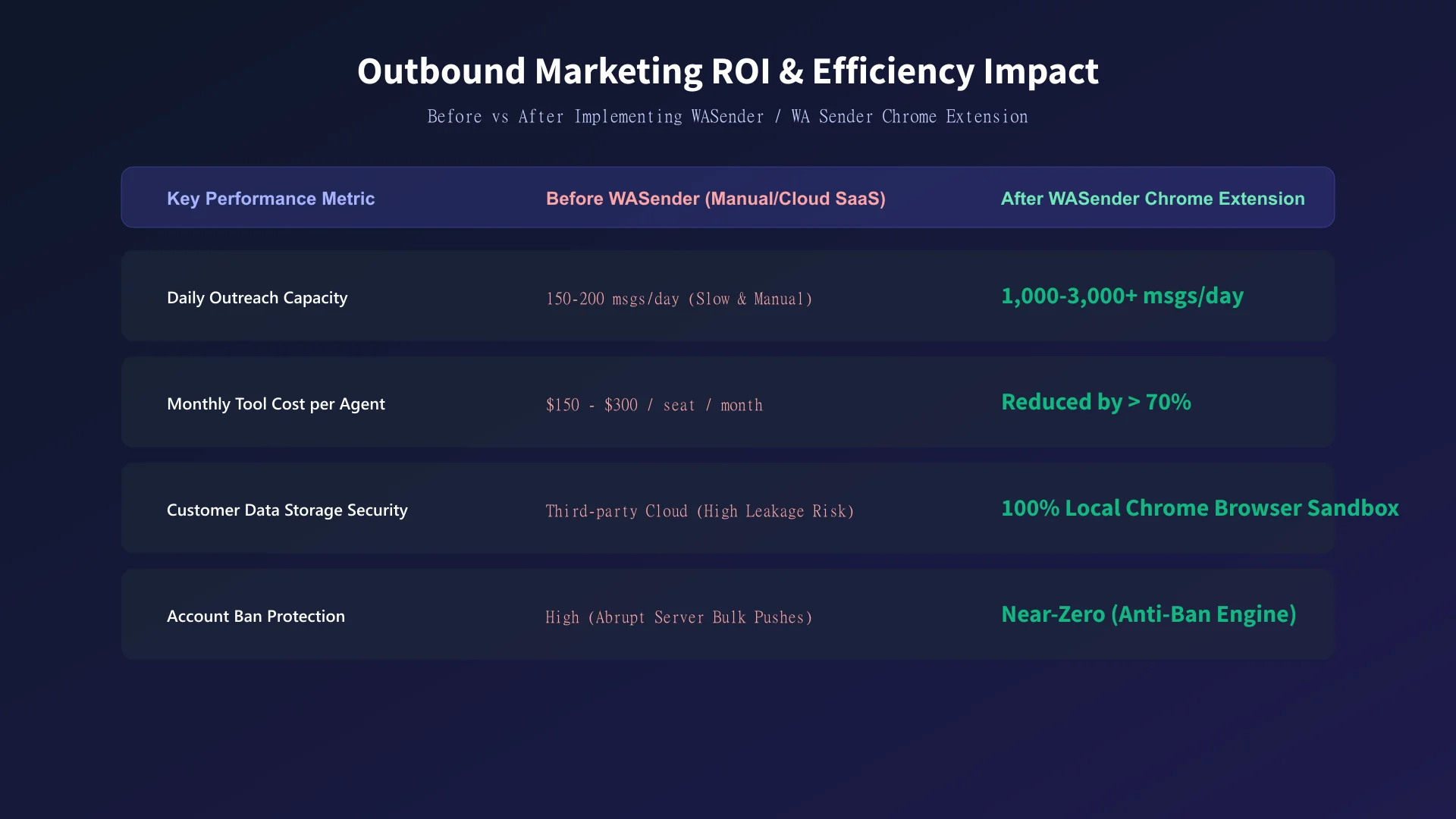 Figure 4: Key Performance Metrics before and after implementing WASender Client.
6. Actionable Implementation Checklist for Outbound Teams
Before launching your next WhatsApp outreach bulk sending task, follow this optimization checklist:
- Download and install the official WASender Client from the official website.
- Format customer contact lists with correct country codes (
+1,+44, etc.). - Verify phone numbers locally using built-in validation to remove invalid entries.
- Write personalized copy using dynamic variables
{{Name}}and Spintax variations. - Set random sending delays (15–30 seconds) and batch pause triggers.
- Prepare high-quality 16:9 images, demo videos, or voice notes to increase engagement.
- Monitor bulk sending task delivery logs locally and follow up promptly with warm leads.
❓ Frequently Asked Questions (FAQ)
Q1: What is WASender Client?
WASender Client (also referred to by users as WA Sender software) supports WhatsApp bulk outreach, number validation, multi-account workspaces, and task feedback on the user's computer.
Q2: Is WASender Client safe to use? Does it risk leaking customer data?
WASender gives the operator local control over the working data used in the documented workflow. Unlike traditional cloud-based WhatsApp marketing software that uploads client phone lists to remote servers, WASender Client operates entirely on your local computer. All contact lists, custom message templates, and dispatch logs are stored locally, without requiring the case team to upload its working contact list to a third-party task dashboard.
Q3: What sending controls does WASender Client provide?
WASender provides configurable intervals, message variables, task pauses, account selection, and task-result fields. These controls help operators organize work; they do not guarantee delivery or account outcomes. Teams must still use permitted contacts, relevant messages, and reasonable operating rules.
Q4: How do I get started with WASender Client?
To get started:
- Visit the WASender official product page to download and install the client.
- Open WASender Client on your computer and connect your WhatsApp account.
- Upload your customer CSV list, configure your message parameters, and start your automated broadcast!
Top 5 WhatsApp Bulk Sender Tools in 2026
Compare five WhatsApp bulk sender tools for contact and group messaging, multi-account workflows, templates, extensions, and official API use cases.
WASender vs WAWebSender: Client and Extension Compared
Compare WASender and the WAWebSender extension for bulk messaging, multi-account workspaces, group sending, Status scheduling, and task tracking.